Rebellion & Resonance
Effective date: 5 October 2026 · Version 1.2
In Rebellion you can listen to your playlists from Resonance — the APERTURESyndicate music service — and to music from your own folder. This document explains how that works and what you may do with that music. It supplements the Resonance Terms of Service, which apply in full to Resonance music in the game, and the Resonance Privacy Addendum.
We write these documents in good faith and keep them accurate to how the game actually works. They have not yet been reviewed by qualified Estonian legal counsel.
1. How to connect
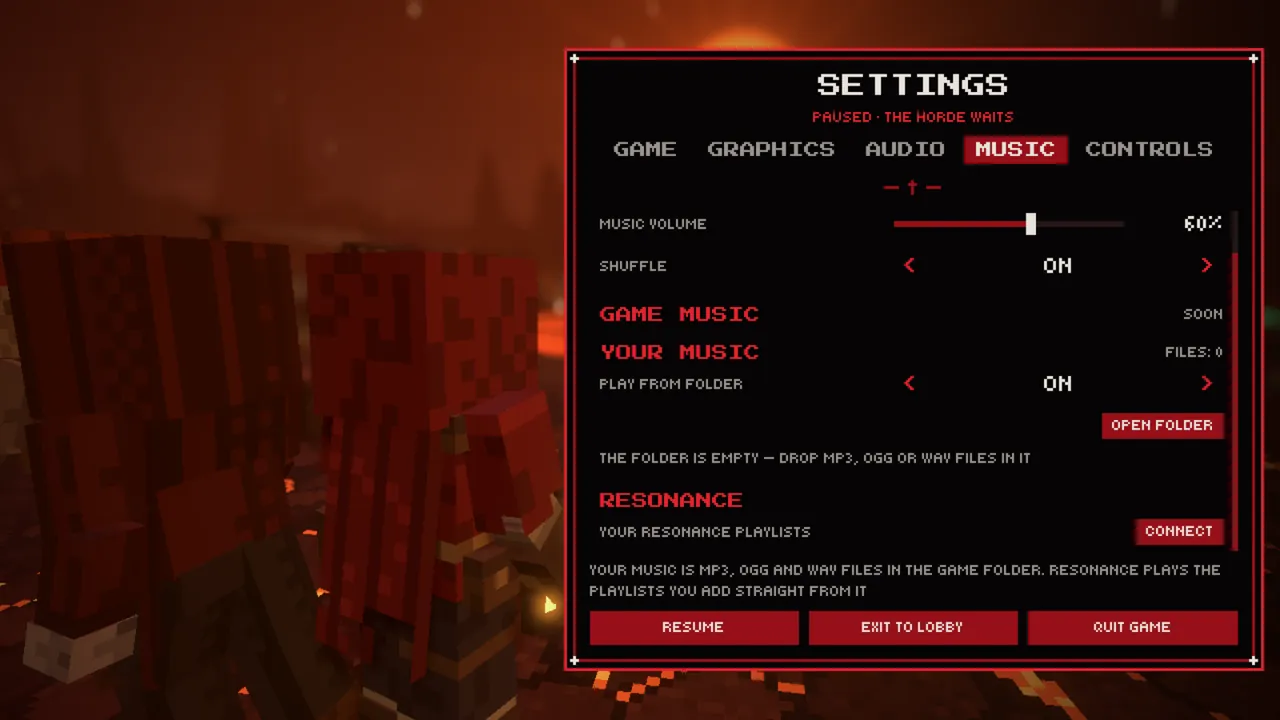
Settings → Music → Resonance → Connect. If you are not signed in, the game
opens sign-in in your browser; if you are signed in without music access, it asks
you to sign in again with it. The APERTURESyndicate consent screen names this
access — resonance:read, reading your playlists. It is not requested at an
ordinary sign-in to the game.
You then add the playlists you want to the game and switch them on or off. The game remembers which playlists you added in its settings on your computer.
2. What the game receives
| Receives | Does not receive |
|---|---|
| Your playlists and other people's public playlists you saved: name, number of tracks | Your handle, or other users' identifiers |
| The tracks in those playlists: title, artist, duration, a track reference | Your listening history, likes, follows, or subscription and payment data |
| A track's audio through a single-use or time-limited link | Other people's private playlists, other people's cloud files, or playlists of people who blocked you |
The access is narrow: it opens only reading playlists and audio. The website and other apps do not work with it, and it is not issued to developers.
3. How the audio arrives
- MP3 comes directly.
- Other formats (the catalogue's AAC and lossless) are transcoded by our server into Ogg Vorbis through a single-use link valid for 5 minutes: 224 kbit/s with Premium, 160 kbit/s without. The transcoded file is not stored on our side.
- Open-catalogue tracks from Audius come from Audius network nodes through our redirect.
- Your cloud files (Locker) play with Premium, as in Resonance; the free slots for your profile anthem and decorations play without it.
- Regional restrictions and track removals apply exactly as in Resonance.
Limits: no more than 60 audio requests a minute and 600 different transcoded tracks a day per person; if the server is busy transcoding, the game tries once more and then skips the track.
4. Streaming only, no copies on disk
Resonance music in the game plays as a stream, as in Resonance itself: the audio is decoded as it downloads and starts playing after about 0.2–0.6 seconds.
- Tracks are never written to disk — not catalogue tracks, not Audius tracks, not your cloud files. Everything is held only in the game's memory: for MP3, a window of up to 8 MB ahead of what is playing; for a transcoded Ogg, the whole file, usually 3–7 MB. What has been played is released straight away, and the memory is freed when you quit.
- This is not a Resonance offline download and does not replace one: without a connection, Resonance music does not play in the game.
- Earlier versions kept a cache of downloaded tracks on disk (the
music_cachefolder, up to 512 MB). The new version erases it on first launch.
Recording the audio the game plays, extracting it or playing it outside the game is still not allowed — Section 3 of the Resonance Terms of Service prohibits it.
5. What counts
A catalogue track from which the game has actually played 30 seconds or more of audio counts in Resonance exactly like a play in Resonance itself:
- for the artist — as a play under the Royalty & Payout Policy;
- for you — in your listening history, statistics and listening streak.
The game reports the track, a playback session number and how long it played. It does not report plays of your own cloud files. There is no private session in the game — if you do not want plays in your history, do not switch Resonance playlists on in the game.
Music plays only on your computer: it is not sent to your squad.
6. Rights in the music
Resonance music in the game is the same personal, non-commercial listening under Section 3 of the Resonance Terms of Service. The game is one more player, not a new licence: the rights in the tracks belong to the artists and rightsholders.
7. Streams and recordings
Section 3 of the Resonance Terms of Service prohibits broadcasting catalogue content or making it available outside your own account. A stream or a published video with Resonance music is such a broadcast. Before going live or recording, switch Resonance playlists off or turn the music volume in the game's settings down to zero.
The risks if you do not: the platform blocking or muting the video, rightsholder complaints, strikes against your channel, and measures under our Copyright & Takedown Policy. You are responsible for them.
The exception is music you hold the rights to use that way — for example, your own releases. The other rules for streaming are in Streams, Videos & Screenshots.
8. Your own music folder
The game plays MP3, Ogg Vorbis and WAV files from the music folder in the
game's data folder (%LOCALAPPDATA%\APERTURESyndicate\Rebellion Saves\music\; the
"Open folder" button on the Music tab goes there), including subfolders, up to
2,000 files. A name like "Artist - Title.mp3" becomes the track
caption.
These files are never uploaded and stay on your computer; their names show in the settings and go into the game's logs. Put only music you have the rights to in that folder — you are responsible for it and for using it in streams. The game has no music of its own yet: that source is marked "Soon" in the settings.
9. How to switch it off
- Switch the playlists or the Resonance source off in the music settings.
- Sign out in the game — the stored sign-in and the Resonance access are removed from your computer.
10. Availability
Resonance music in the game depends on Resonance and the network: tracks can leave the catalogue, be unavailable in your country or temporarily fail to play. We do not guarantee that a particular track or playlist will be available (Section 11 of the Resonance Terms of Service).
Contact
Questions about music in the game — [email protected]. We accept requests in English or Estonian.
APERTURESyndicate OÜ · Registry code 17384111 · VAT EE102972654 · Priisle tee 8, Lasnamäe linnaosa, Tallinn, Harju maakond, 13914, Estonia
The English version is the controlling version; translations are provided for convenience.
Version history
- v1.2 — 2026-10-05 — Resonance music streams and is never written to disk: the section on the 512 MB cache is replaced, and the old cache is erased on the new version's first launch; a play counts from 30 seconds of audio actually played; your own music folder now lives in the data folder.
- v1.1 — 2026-10-04 — Screenshots from the game.
- v1.0 — 2026-10-04 — First publication.